> For the complete documentation index, see [llms.txt](https://docs.enlyze.com/llms.txt). Markdown versions of documentation pages are available by appending `.md` to page URLs; this page is available as [Markdown](https://docs.enlyze.com/en/connect/ot-connectivity/supported-industrial-protocols/opc-da.md).

# OPC DA

This guide walks you through connecting data sources that communicate via OPC DA (OPC Data Access). OPC DA is the classic, COM/DCOM-based OPC standard and therefore a Windows technology. It is vendor-independent and is mainly provided through an OPC DA server by older control, SCADA, and visualization systems.

Because OPC DA builds on COM/DCOM, the Linux-based Edge Device cannot talk to an OPC DA server directly. ENLYZE therefore connects OPC DA through the **EnlyzeDA Gateway**: a Windows component that accesses one or more OPC DA servers and makes them available to the Edge Device over TCP (default port `54554`).

{% hint style="info" %}
OPC DA is an open, vendor-independent protocol supported by a wide range of manufacturers and devices. If you are unsure whether your device provides an OPC DA server, contact the manufacturer. For newer devices, OPC-UA is often available as well and is usually the simpler choice.
{% endhint %}

{% hint style="warning" %}
**Prerequisite: EnlyzeDA Gateway**

Connecting via OPC DA requires the EnlyzeDA Gateway. It is installed on a Windows machine that has access to the OPC DA server (locally on the same machine or via DCOM on another machine on the network). The Edge Device then connects to the gateway, not directly to the OPC DA server. The gateway is set up together with ENLYZE.
{% endhint %}

## Supported devices

OPC DA is supported by many older, Windows-based control and supervisory systems, as well as SCADA and visualization software that provides an OPC DA server. In principle, any OPC DA server that is reachable for the EnlyzeDA Gateway can be connected.

ENLYZE can use the gateway to read out which OPC DA server is available on a machine and under which name it is addressed. When in doubt, the ENLYZE team helps you identify the right server.

## Required information

<table><thead><tr><th width="293.6058349609375">Information</th><th>Comment</th></tr></thead><tbody><tr><td>Name</td><td>Pick a descriptive name for your data source</td></tr><tr><td>Edge Device used for the connection</td><td>Printed on a sticker on each Edge Device. Follows the pattern <code>adjective-scientist</code></td></tr><tr><td>Machine</td><td>Each data source is assigned to exactly one machine</td></tr><tr><td>Manufacturer</td><td>Manufacturer of the device or supervisory system, e.g. Siemens, B&#x26;R, Allen Bradley</td></tr><tr><td>Device information</td><td>Model number or designation of the supervisory system</td></tr><tr><td>IP address</td><td>The IPv4 address of the <strong>EnlyzeDA Gateway</strong>, not of the OPC DA server. It must be <a href="/pages/NOoLZt9S2VJxBY2IkzbA">reachable</a> from the Edge Device</td></tr><tr><td>Port</td><td>Default: <code>54554</code> (EnlyzeDA Gateway, TCP)</td></tr><tr><td>DA server name</td><td>Program ID (ProgID) of the OPC DA server to access, e.g. <code>Matrikon.OPC.Simulation.1</code>.<br><a href="#da-server-name">→ How to find the DA server name</a></td></tr></tbody></table>

## Understanding the connector details

When connecting via OPC DA, the Edge Device connects to the EnlyzeDA Gateway and specifies which OPC DA server the gateway should access. This requires three values: the **IP address** and **port** of the gateway, and the **DA server name**.

### DA server name

A single machine can have several OPC DA servers installed. The **DA server name** defines which one the gateway should access. It is the program ID (ProgID) of the OPC DA server, that is, the unique identifier under which the server is registered in the COM system (e.g. `Matrikon.OPC.Simulation.1` or `OPC.SimaticNET`).

ENLYZE can list which OPC DA servers are registered on the gateway machine. You determine the right name together with the ENLYZE team or the manufacturer of the supervisory system.

{% stepper %}
{% step %}

#### Connect the data source to the network

If not already done, establish a network connection between the Edge Device and the EnlyzeDA Gateway. The Edge Device must reach the gateway over TCP port `54554`. The gateway itself needs access to the OPC DA server. See [Integration scenarios](/en/connect/integration-scenarios.md) for the available options.

{% hint style="info" %}
The connection between the gateway and the OPC DA server runs over COM/DCOM. See [Tips & practical notes](/en/connect/ot-connectivity/supported-industrial-protocols/opc-da/known-issues.md) for guidance on DCOM configuration.
{% endhint %}
{% endstep %}

{% step %}

#### Create the data source

Open the [ENLYZE Manufacturing Data Platform](https://app.enlyze.com/platform), select the machine you want to add the data source to, and click *+ Data source*.

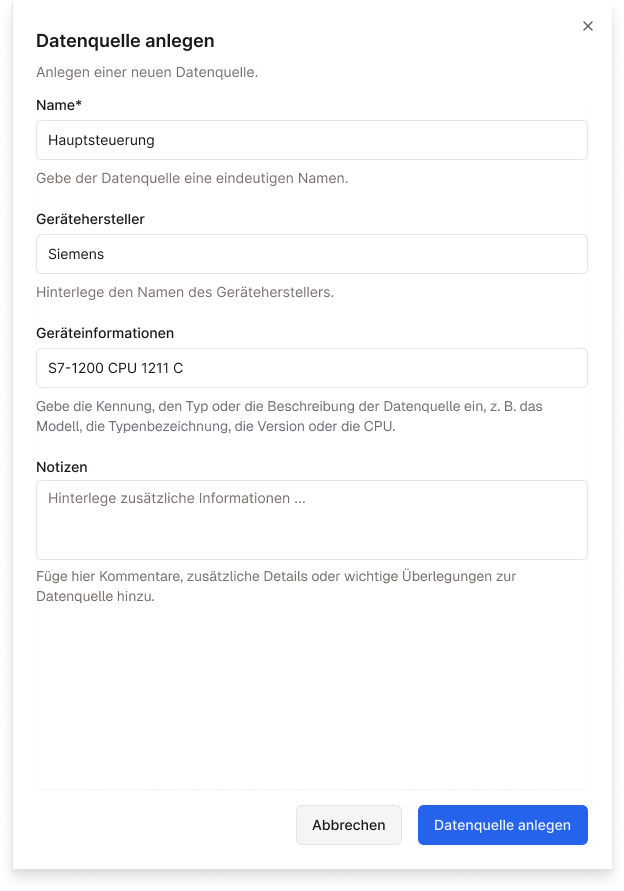
Enter the device details first.

<figure><img src="/files/69pF4p3KjwqDvCxrYaVg" alt="" width="312"><figcaption><p>Creating a data source in the ENLYZE Platform</p></figcaption></figure>
{% endstep %}

{% step %}

#### Add connection details

To establish the connection and start recording data, enter the connection details.

Click *Add connection details* and enter the IP address and port of the EnlyzeDA Gateway and the DA server name as described above. Then *save* the values.
{% endstep %}

{% step %}

#### Add variables

The `OPC DA` protocol supports [Variable Discovery](/en/connect/ot-connectivity.md#variable-discovery), so variables are added automatically. The first Variable Discovery is triggered after you save the connection details.

{% hint style="info" %}
OPC DA servers often run on older machines and respond slowly. The first Variable Discovery can therefore take a few minutes. See [Tips & practical notes](/en/connect/ot-connectivity/supported-industrial-protocols/opc-da/known-issues.md) for details.
{% endhint %}

{% hint style="warning" %}
No data is recorded after Variable Discovery completes. You first have to select the [variables](/en/variable-mapping/contextualisation.md) to record. Follow our variable onboarding flow.
{% endhint %}
{% endstep %}
{% endstepper %}

## See also

* [Tips & practical notes](/en/connect/ot-connectivity/supported-industrial-protocols/opc-da/known-issues.md): notes on operating the OPC DA connector, e.g. on DCOM configuration and slow OPC DA servers.

If you have any questions, feel free to contact us at <support@enlyze.com>.
