> For the complete documentation index, see [llms.txt](https://docs.enlyze.com/llms.txt). Markdown versions of documentation pages are available by appending `.md` to page URLs; this page is available as [Markdown](https://docs.enlyze.com/en/resources/production-hierarchy/machines.md).

# Machines

Within each [site](/en/resources/production-hierarchy/sites.md) you define one or more **machines**. A machine is the smallest unit for which ENLYZE calculates KPIs. It is not necessarily a physical machine, and can mean:

* a single physical machine,
* a logical representation of multiple physical machines (e.g., a production line),
* peripheral equipment that does not produce directly but influences production (e.g., an energy meter for the whole shop floor or sensors measuring air temperature and humidity).

## Use cases

* If your production is organized along lines (e.g., filling → labeling → packaging), each step can be modeled as a separate machine.
* Alternatively, you can model the entire line as one machine if your tracking and reporting are done at the line level.

Which variant suits you is explained in the [Modeling your production](#modeling-your-production) section below.

## Machine-level insights

* [**OEE**](/en/concepts/understanding-oee.md) (Overall Equipment Effectiveness) is calculated per machine.
* [**Downtimes**](/en/resources/production-context/downtimes.md) are recorded and categorized at the machine level.
* [**Production runs**](/en/resources/production-context/production-runs.md) are mapped to machines, which allows for precise tracking of what was produced where and when.

{% hint style="info" %}
In production lines where the production steps are split across multiple machines, you can assign production runs to just one representative machine in the line.
{% endhint %}

## Machines in the Platform area

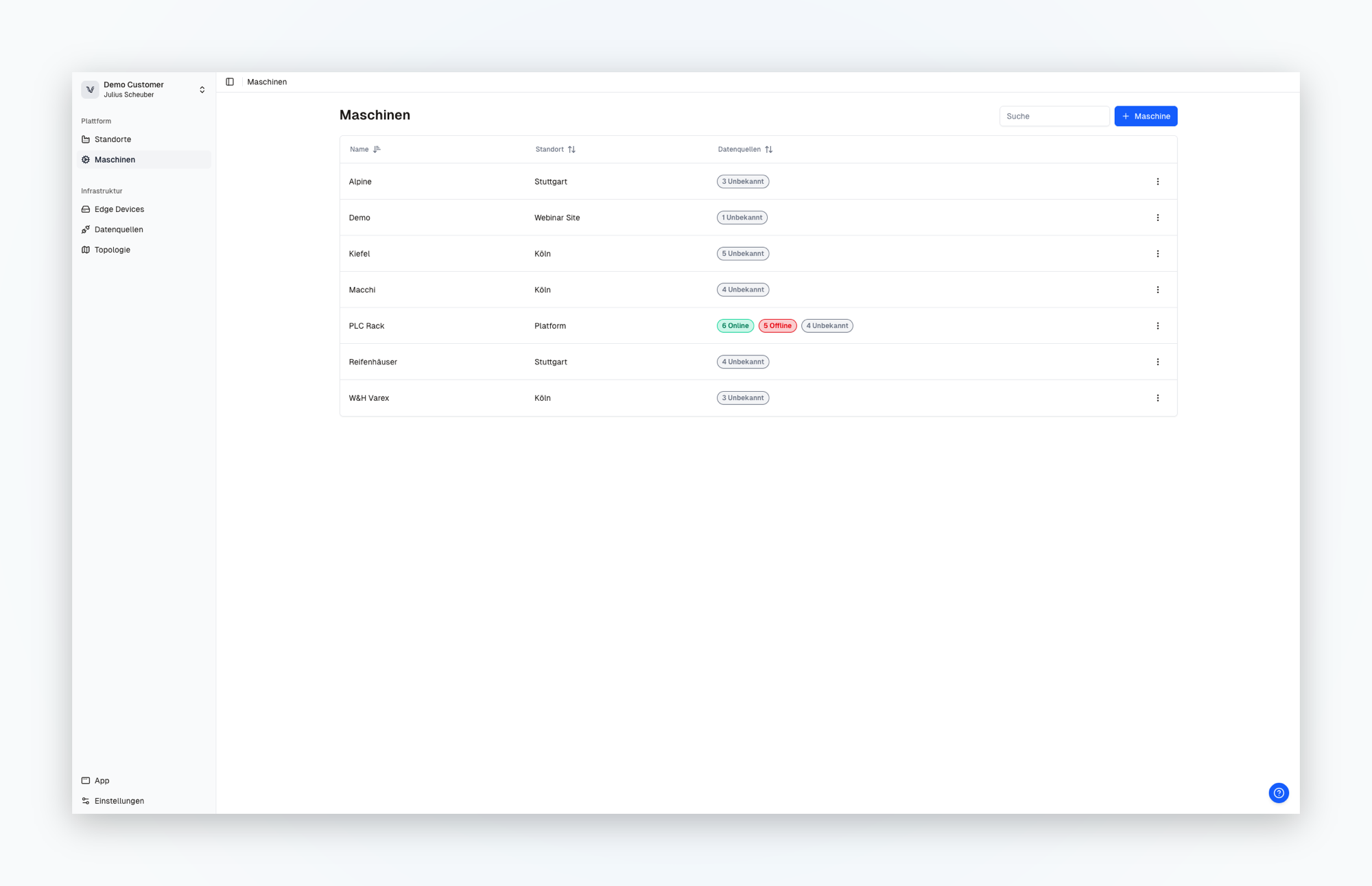
In the Platform area, the machines overview shows all machines across all sites, each with its site name and the connection status of its data sources (online, offline, or unknown). The detail view of a machine shows its data sources and the assigned edge devices.

<figure><img src="/files/vjkPaE1A85XOU07BSZkM" alt="The machines overview in the Platform area as a table"><figcaption><p>The Platform area lists all machines of the organization with site and data-source status.</p></figcaption></figure>

[**Open in the app**](https://app.enlyze.com/platform/machines)

## Machines in the App area

The App area has no management overview like the Platform area. Instead, you encounter machines in two ways:

* **As a filter:** machines are present throughout. You configure your views, KPIs, and analyses by narrowing them down to individual machines.
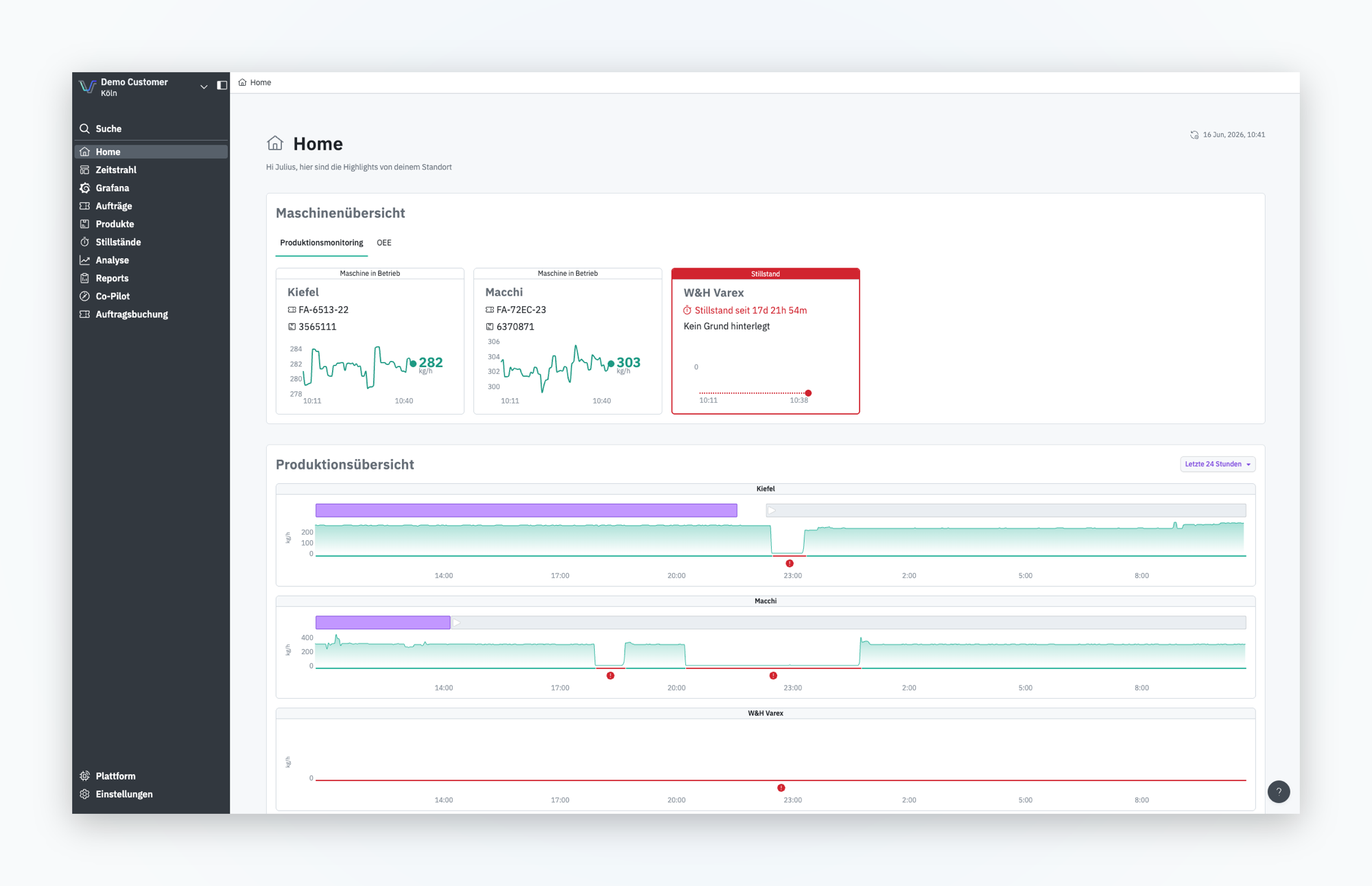
* **In the Home overview:** here you see all machines of your site at a glance, with production monitoring, machine status, and OEE.

<figure><img src="/files/X6rF0grU98sUbI2tM2Ai" alt="The Home overview in the App area showing all machines of the site"><figcaption><p>The Home overview shows all machines of the site with production monitoring and OEE.</p></figcaption></figure>

[**Open in the app**](https://app.enlyze.com/)

## Relationships

* A machine belongs to exactly one [site](/en/resources/production-hierarchy/sites.md).
* A machine can have multiple [data sources](/en/resources/data-infrastructure/data-sources.md).
* [Production runs](/en/resources/production-context/production-runs.md) are assigned to a machine.

## Modeling your production

One of the first decisions when modeling is how you scope your machines: do you model a line as a single machine or split it into several? The following two examples show when each variant makes sense.

### Example 1: line as a single machine

**Scenario**\
You operate a plastic extrusion line with the following components:

* Extruder
* Calibrator
* Haul-off
* Cutter

These components **always run together** as a tightly integrated unit, and you **track performance at the line level** rather than per station.

**ENLYZE modeling**

* **Site:** “Main Extrusion Plant”
* **Machine:** “Extrusion Line 1”
* **Data sources:** multiple PLCs (e.g., one for the extruder, one for haul-off & calibrator, one for the cutter), all linked to the machine
* **Production runs:** assigned to “Extrusion Line 1”

**Benefits:**

* Simplified tracking
* Aligned with business logic when line performance is assessed as a whole
* OEE losses can be attributed more holistically

### Example 2: line split into multiple machines

**Scenario**\
Your extrusion line consists of the same four components, but:

* Downtimes are often isolated (e.g., the cutter stops while the extruder continues producing scrap)
* You want to optimize individual steps in the process (e.g., reduce calibration time or minimize haul-off slippage)

**ENLYZE modeling**

* **Site:** “Main Extrusion Plant”
* **Machines:**
  * “Extruder”
  * “Calibrator”
  * “Haul-off”
  * “Cutter”
* **Data sources:** each PLC is linked to its corresponding machine (or cloned if needed)
* **Production runs:** assigned to one designated machine (e.g., the extruder), while others are auxiliary

**Benefits:**

* More granular visibility into weak points
* Enables station-specific optimizations
* Useful when partial line stoppages are frequent

{% hint style="info" %}
**Still unsure how best to model your production?**\
Don't hesitate to contact us. We are happy to discuss your specific case with you.
{% endhint %}